
Introduction
Workplace safety is one of the most important responsibilities for every business. Whether a company operates in construction, manufacturing, healthcare, logistics, or retail, protecting employees from accidents and hazards is essential. As organizations grow, managing safety manually becomes more difficult. This is where occupational safety software plays a valuable role.
Occupational safety software is a digital solution designed to help businesses monitor workplace risks, report incidents, manage compliance, and improve overall safety performance. Instead of relying on paper records or spreadsheets, companies can use one centralized platform to organize safety-related tasks and maintain accurate documentation.
This article explains what occupational safety software is, its key features, benefits, and how to choose the right solution for your organization.
What Is Occupational Safety Software?
Occupational safety software is a specialized application that helps organizations manage workplace health and safety programs. It simplifies safety processes by automating reporting, inspections, audits, training records, and compliance management.

The software is commonly used by:
- Manufacturing companies
- Construction firms
- Oil and gas businesses
- Warehouses
- Healthcare facilities
- Transportation companies
- Government organizations
- Educational institutions
Its primary goal is to reduce workplace injuries while ensuring compliance with safety regulations.
Why Workplace Safety Matters
Every workplace has potential hazards. These may include:
- Slippery floors
- Heavy machinery
- Chemical exposure
- Electrical equipment
- Fire risks
- Ergonomic injuries
- Vehicle accidents
Poor safety management can result in:
- Employee injuries
- Higher insurance costs
- Legal penalties
- Reduced productivity
- Equipment damage
- Loss of company reputation
Occupational safety software helps organizations identify risks before they become serious problems.
Key Features of Occupational Safety Software
1. Incident Reporting
Employees can quickly report:
- Workplace injuries
- Near misses
- Property damage
- Safety concerns
Reports can include photos, videos, and detailed descriptions, making investigations easier.
2. Risk Assessment
The software helps companies identify hazards and evaluate their severity.
Risk assessments allow organizations to:
- Prioritize dangerous areas
- Assign corrective actions
- Track improvements
3. Safety Inspections
Routine inspections help maintain a safe workplace.
Safety software often includes digital inspection checklists for:
- Equipment
- Vehicles
- Fire extinguishers
- Emergency exits
- Personal protective equipment (PPE)
Mobile inspections reduce paperwork and save time.
4. Compliance Management
Many industries must follow safety regulations.
The software helps businesses maintain compliance by tracking:
- Safety policies
- Regulatory requirements
- Inspection schedules
- Certification renewals
- Documentation
This reduces the risk of penalties during audits.
5. Employee Training
Training is essential for workplace safety.
Occupational safety software stores:
- Training records
- Certification dates
- Course completion status
- Upcoming renewals
Managers receive reminders when employees need updated training.
6. Corrective Actions
After identifying a safety issue, organizations can assign corrective tasks.
The software tracks:
- Responsible employees
- Deadlines
- Progress updates
- Completion status
This ensures problems are resolved promptly.
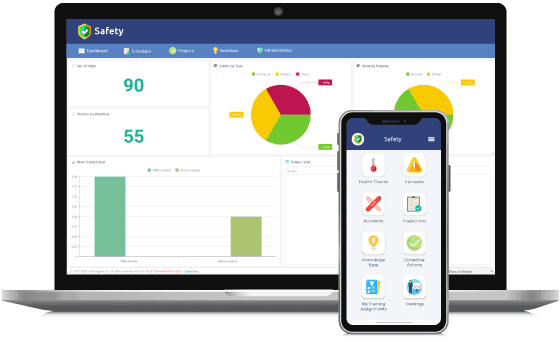
7. Safety Dashboards
Interactive dashboards provide real-time information such as:
- Number of incidents
- Open hazards
- Completed inspections
- Compliance status
- Injury trends
Managers can monitor overall safety performance from one screen.
Benefits of Occupational Safety Software
Improved Employee Safety
The biggest benefit is protecting employees from workplace accidents.
Early hazard identification reduces injuries and creates a safer work environment.
Better Compliance
Keeping safety records organized helps companies meet legal requirements.
Digital documentation simplifies inspections and audits.
Increased Productivity
Automated workflows eliminate manual paperwork.
Employees spend less time filling out forms and more time focusing on their work.
Faster Incident Response
Immediate reporting allows managers to investigate incidents quickly.
Rapid action helps prevent similar accidents in the future.
Lower Costs
Workplace injuries are expensive.
Safety software reduces costs associated with:
- Medical expenses
- Workers’ compensation
- Equipment damage
- Downtime
- Legal claims
Accurate Record Keeping
Digital storage prevents lost paperwork.
Safety records remain organized and accessible whenever needed.
Industries That Use Occupational Safety Software
Many industries rely on safety management systems.
Construction
Construction companies use safety software to:
- Manage job site inspections
- Track equipment safety
- Monitor worker certifications
Manufacturing
Manufacturers monitor:
- Machine inspections
- Hazard reporting
- Safety training
Healthcare
Hospitals use safety software to manage:
- Infection control
- Employee injuries
- Medical waste handling
Transportation
Transportation businesses monitor:
- Driver safety
- Vehicle inspections
- Accident reports
Energy
Oil, gas, and utility companies use safety software for high-risk operations and regulatory compliance.
Cloud-Based vs On-Premise Software
Cloud-Based Software
Advantages include:
- Accessible anywhere
- Automatic updates
- Lower maintenance
- Easy scalability
- Secure backups
Most modern organizations prefer cloud solutions.
On-Premise Software
Installed on company servers, this option offers:
- Greater control
- Internal data management
- Custom security settings
However, it often requires higher maintenance costs.
How to Choose the Right Occupational Safety Software
Consider the following factors before purchasing:
Ease of Use
Choose software with a simple interface that employees can learn quickly.
Mobile Access
Mobile apps allow inspections and incident reporting from any location.
Customization
The software should support customized forms, checklists, and workflows.
Reporting
Look for detailed analytics and customizable reports.
Integration
Ensure the software integrates with HR, payroll, or enterprise systems if needed.
Customer Support
Reliable technical support is important for smooth implementation.
Pricing
Compare subscription plans and features to find the best value for your budget.
Best Practices for Successful Implementation
To maximize the benefits of occupational safety software:
- Train all employees on proper usage.
- Update safety policies regularly.
- Encourage immediate incident reporting.
- Schedule regular inspections.
- Review safety reports monthly.
- Monitor corrective actions until completion.
- Continuously improve safety processes using collected data.
Future Trends in Occupational Safety Software
Technology continues to improve workplace safety.
Future innovations include:
- Artificial Intelligence (AI) for hazard prediction
- Predictive analytics
- Wearable safety devices
- Internet of Things (IoT) sensors
- Real-time environmental monitoring
- Voice-enabled reporting
- Advanced mobile applications
- Automated compliance reporting
These technologies will help organizations identify risks earlier and make faster, data-driven safety decisions.
Also Read:https://techehs.com/
Conclusion
Occupational safety software has become an essential tool for organizations that want to create safer workplaces, improve compliance, and reduce operational risks. By digitizing inspections, incident reporting, employee training, and corrective actions, businesses can streamline safety management while protecting their workforce.
Whether you run a small business or a large enterprise, investing in occupational safety software can lead to fewer workplace accidents, lower compliance costs, improved productivity, and a stronger safety culture. As technology continues to evolve, these platforms will become even more powerful, helping organizations build healthier, safer, and more efficient work environments.