
Email remains one of the most important communication tools for personal and professional use. Whether you’re managing work projects, staying in touch with family, or organizing online accounts, having the right email app can make a significant difference. The best email apps offer fast performance, powerful organization features, strong security, and seamless integration across multiple devices.
In this guide, we’ll explore the best email apps in 2026, compare their features, and help you choose the one that best suits your needs.
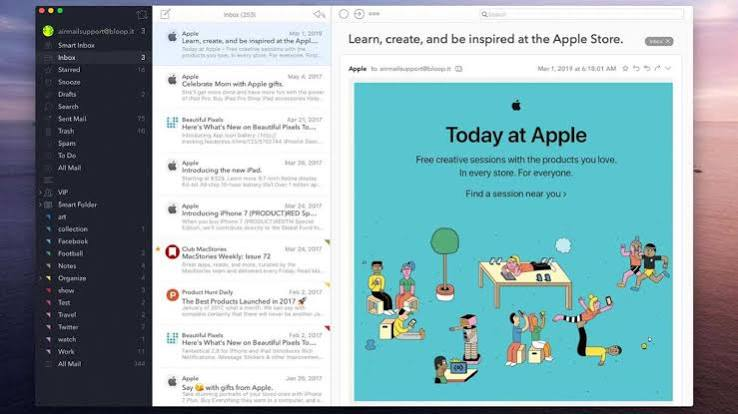
Why Choosing the Right Email App Matters
An email app does much more than send and receive messages. Modern email clients help users stay organized, improve productivity, and protect sensitive information. A quality email app should provide:
- Fast and reliable performance
- Easy account setup
- Support for multiple email providers
- Spam filtering
- Strong security and encryption
- Calendar and contact integration
- Smart search features
- Cross-platform compatibility
Selecting the right app depends on your workflow and personal preferences.
1. Microsoft Outlook
Microsoft Outlook is one of the most popular email applications for business and personal users.
Key Features
- Clean and professional interface
- Built-in calendar and task management
- Excellent Microsoft 365 integration
- Supports multiple email accounts
- Powerful search functionality
- Focused Inbox for important emails
Pros
- Excellent productivity tools
- Great for professionals
- Available on Windows, Mac, Android, iPhone, and the web
Cons
- Some advanced features require a Microsoft 365 subscription.
2. Gmail
Gmail is Google’s email platform and remains one of the easiest email apps to use.
Key Features
- Smart spam protection
- AI-powered email suggestions
- Large storage capacity
- Google Workspace integration
- Fast search using Google technology
- Excellent mobile apps
Pros
- Free for most users
- Easy to use
- Excellent spam filtering
Cons
- Advanced business features require Google Workspace.
3. Mozilla Thunderbird
Mozilla Thunderbird is a free, open-source email client trusted by millions.
Key Features
- Supports unlimited email accounts
- Powerful filtering
- Highly customizable
- Calendar support
- Strong privacy features
- No subscription required
Pros
- Completely free
- Open-source
- Excellent for advanced users
Cons
- Interface feels less modern than some competitors.
4. Apple Mail
Apple Mail is the default email application for macOS, iPhone, and iPad.
Key Features
- Clean design
- Fast synchronization
- Excellent iCloud support
- Privacy Protection features
- VIP contacts
- Smart Mailboxes
Pros
- Free for Apple users
- Smooth performance
- Excellent ecosystem integration
Cons
- Best suited for Apple devices only.
5. Spark Mail
Spark focuses on productivity and team collaboration.
Key Features
- Smart Inbox
- Email scheduling
- Shared drafts
- Follow-up reminders
- Email templates
- Team collaboration tools
Pros
- Excellent user interface
- Great for business teams
- Smart organization features
Cons
- Premium features require a subscription.
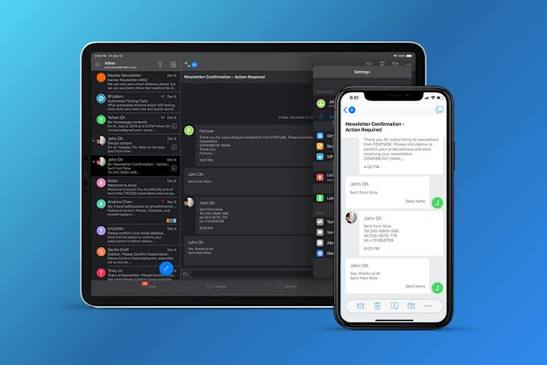
6. BlueMail
BlueMail is a versatile email app supporting almost every email provider
.
Key Features
- Unified inbox
- Multiple account support
- Dark mode
- Smart notifications
- Calendar integration
- Fast synchronization
Pros
- Easy to use
- Supports many providers
- Available on multiple platforms
Cons
- Some premium features require payment.
7. Proton Mail
Proton Mail is ideal for users who prioritize privacy and security.
Key Features
- End-to-end encryption
- Zero-access encryption
- Open-source platform
- Strong privacy protection
- No tracking
- Secure file sharing
Pros
- Excellent security
- User-friendly interface
- Strong privacy features
Cons
- Limited storage in the free version.
8. eM Client
eM Client is a feature-rich desktop email application.
Key Features
- Calendar
- Contacts
- Tasks
- Notes
- Chat integration
- Email translation
Pros
- Attractive interface
- Business-friendly features
- Supports Gmail, Outlook, Yahoo, and more
Cons
- Free version supports a limited number of accounts.
9. Mailbird
Mailbird combines email management with productivity tools.
Key Features
- Unified inbox
- App integrations
- Speed reader
- Custom layouts
- Keyboard shortcuts
- Social media integration
Pros
- Modern design
- Fast performance
- Excellent customization
Cons
- Windows only.
Features to Look for in an Email App
When selecting an email application, consider the following features:
- Easy account management
- Multiple email provider support
- Fast search
- Spam filtering
- Two-factor authentication
- Encryption
- Calendar integration
- Contact management
- Offline access
- Mobile synchronization
These features improve both productivity and security.
Security Tips for Email Users
Protect your email account by following these best practices:
- Use a strong, unique password.
- Enable two-factor authentication (2FA).
- Avoid opening suspicious attachments.
- Keep your email app updated.
- Never share verification codes.
- Regularly review account activity.
- Beware of phishing emails pretending to be legitimate organizations.
Good security habits can help prevent unauthorized access and data loss.
Which Email App Is Best?
The best email app depends on your needs:
- Best for professionals: Microsoft Outlook
- Best free option: Gmail
- Best for privacy: Proton Mail
- Best open-source client: Mozilla Thunderbird
- Best for Apple users: Apple Mail
- Best for collaboration: Spark Mail
- Best for customization: Mailbird
- Best all-around desktop client: eM Client
Each app offers unique strengths, so choose one that matches your workflow and device ecosystem.
Frequently Asked Questions
Which email app is completely free?
Gmail and Mozilla Thunderbird are excellent free options. Apple Mail is also free for Apple device users.
Which email app offers the best security?
Proton Mail is widely recognized for its strong encryption and privacy-focused design.
Can I use multiple email accounts in one app?
Yes. Most modern email apps support multiple accounts from providers like Gmail, Outlook, Yahoo, iCloud, and custom domains.
Which email app is best for business?
Microsoft Outlook is one of the best choices for business users because of its integration with Microsoft 365, calendar, contacts, and productivity tools.
Also Read:https://www.getmailbird.com/
Conclusion
The best email app in 2026 depends on your priorities, whether it’s productivity, privacy, collaboration, or simplicity. Microsoft Outlook is ideal for professionals, Gmail remains the top free option for everyday users, and Proton Mail stands out for users who value privacy and security. Meanwhile, Thunderbird, Spark, Mailbird, BlueMail, Apple Mail, and eM Client each provide excellent features for different types of users.
Before choosing an email app, consider your preferred devices, required features, and security needs. A well-designed email application can save time, improve organization, and make communication more efficient every day.