

Introduction
A webcam has become an essential device for both personal and professional use. Whether you attend online meetings, stream games, create YouTube videos, teach online classes, or simply chat with family and friends, a high-quality webcam can significantly improve your video experience. While many laptops come with built-in webcams, they often lack the image quality, sharpness, and features found in dedicated external webcams.
This guide explains what makes a great webcam, the key features to consider, and some of the best webcams available today.
Why You Need a Good Webcam
A quality webcam provides clear video, accurate colors, and smooth performance. It can make you look more professional during video conferences and improve the viewing experience for your audience if you create online content.
Some common uses include:
- Video conferencing
- Online teaching
- Live streaming
- YouTube recording
- Gaming
- Virtual interviews
- Video calls with friends and family
A good webcam also performs better in low-light conditions and captures sharper images than most built-in laptop cameras.
Features to Look for in a Webcam
1. Video Resolution
Resolution determines how clear your video appears.
- 720p HD – Suitable for basic video calls.
- 1080p Full HD – Ideal for most users and offers excellent quality.
- 4K Ultra HD – Best for professionals, streamers, and content creators.
Higher resolutions produce more detailed and professional-looking videos.
2. Frame Rate
Frame rate affects how smooth your video appears.
- 30 FPS – Standard for meetings and casual use.
- 60 FPS – Better for gaming, streaming, and professional video production.
A higher frame rate creates smoother motion.
3. Autofocus
Autofocus automatically keeps your face sharp even if you move around. This feature is useful for presentations, streaming, and online teaching.
4. Low-Light Performance
Many webcams struggle in dim lighting. Premium webcams automatically adjust brightness and exposure to deliver better image quality even in darker rooms.
5. Built-In Microphone
Most webcams include microphones, but quality varies. Some feature noise reduction technology that minimizes background sounds, making your voice clearer during calls.
6. Field of View
The field of view determines how much of the room the webcam captures.
- Narrow angle: Best for individual users.
- Wide angle: Great for group meetings or presentations.
7. Privacy Shutter
Many modern webcams include a privacy cover that blocks the camera when it is not in use. This helps protect your privacy.
Best Webcams Available
Logitech Brio 4K
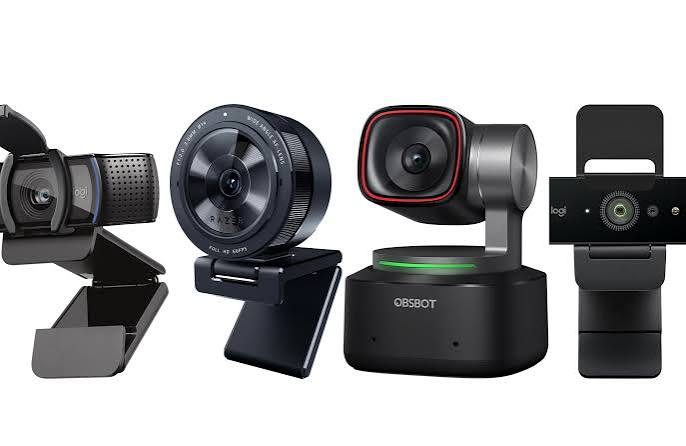
The Logitech Brio is one of the most popular premium webcams. It records in 4K resolution and offers excellent color accuracy, HDR support, and outstanding low-light performance. It is ideal for professionals and content creators.
Logitech C920 HD Pro
The Logitech C920 remains one of the best-selling webcams worldwide. It records in Full HD 1080p, delivers reliable autofocus, and includes dual microphones. It provides excellent value for everyday users.
Razer Kiyo Pro
Designed for gamers and streamers, the Razer Kiyo Pro performs exceptionally well in low-light environments. It delivers smooth Full HD video with impressive image quality.
Elgato Facecam
The Elgato Facecam focuses entirely on video quality. It produces sharp images with natural colors, making it a favorite among streamers and YouTubers.
Microsoft Modern Webcam
Microsoft’s webcam is ideal for business meetings and remote work. It provides Full HD video, HDR support, and integrates well with Windows PCs.
Webcam Buying Tips
Before purchasing a webcam, consider these important factors
- Set a realistic budget.
- Choose at least 1080p resolution.
- Check compatibility with your operating system.
- Read customer reviews.
- Consider your primary purpose.
- Ensure the webcam includes a mounting clip.
- Look for USB plug-and-play support.
Best Webcam for Different Users
For Students
Students usually need a reliable webcam for online classes. A Full HD webcam with a built-in microphone is more than sufficient.
For Office Workers
Professionals attending daily video meetings should prioritize clear video, autofocus, and good microphone quality.
For Streamers
Gamers and live streamers should choose webcams offering excellent low-light performance, sharp image quality, and smooth frame rates.
For Content Creators
YouTubers and video creators benefit from 4K webcams with advanced image controls and excellent color reproduction.
Tips to Improve Webcam Quality
Even the best webcam performs better with proper setup.
- Use natural lighting whenever possible.
- Position the camera at eye level.
- Keep your camera lens clean.
- Use a simple, uncluttered background.
- Maintain a stable internet connection.
- Update webcam drivers regularly.
- Adjust camera settings if supported.
These simple improvements can noticeably enhance your video quality.
Built-In Webcam vs External Webcam
Built-in webcams are convenient but usually offer average image quality. External webcams provide higher resolutions, better autofocus, improved microphones, and superior low-light performance.
If you frequently participate in video meetings or create online content, investing in an external webcam is worthwhile.
Common Webcam Problems
Some users experience issues with webcams, including:
- Blurry image
- Camera not detected
- Poor lighting
- Audio not working
- Driver conflicts
- Slow frame rate
Most of these problems can be solved by updating drivers, reconnecting the webcam, adjusting lighting, or checking privacy settings.
Future of Webcam Technology
Webcam technology continues to improve rapidly. Many modern webcams now include AI-powered features such as automatic framing, background blur, face tracking, noise reduction, and HDR video processing. As remote work and online communication continue to grow, webcams will become even more advanced and user-friendly.
Also Read:https://www.nytimes.com/
Conclusion
Choosing the best webcam depends on your needs and budget. For everyday users, a Full HD webcam offers excellent value and reliable performance. Professionals, streamers, and content creators may benefit from investing in a premium 4K webcam with advanced features like HDR, autofocus, and superior low-light performance.
A quality webcam enhances video calls, online meetings, live streams, and content creation by providing sharper images, smoother video, and clearer audio. By considering factors such as resolution, frame rate, autofocus, microphone quality, and lighting performance, you can find a webcam that perfectly matches your requirements and helps you look your best in every video call.