
Gaming Accessories: A Complete Guide to Enhance Your Gaming Experience
Gaming accessories have become an essential part of modern gaming. Whether you play on a PC, PlayStation, Xbox, or Nintendo Switch, the right accessories can improve your comfort, performance, and overall experience. From gaming keyboards and mice to headsets and controllers, these devices are designed to help players enjoy smoother gameplay and better control.
The gaming industry has grown rapidly over the past decade, and so has the market for gaming accessories. Professional esports players, streamers, and casual gamers all rely on quality equipment to get the best results. This article explores the most popular gaming accessories, their benefits, and tips for choosing the right ones.
Why Gaming Accessories Matter
Gaming accessories are more than just stylish gadgets. They provide practical advantages that improve gameplay. High-quality accessories offer faster response times, better comfort during long gaming sessions, and improved communication with teammates.
Some benefits include:
- Increased gaming accuracy
- Enhanced comfort
- Better sound quality
- Improved reaction time
- Longer device durability
- More immersive gaming experience
Investing in the right accessories can make a noticeable difference, especially in competitive games.
Essential Gaming Accessories
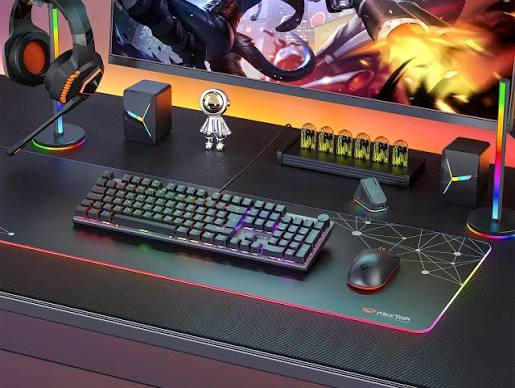
1. Gaming Keyboard
A gaming keyboard is one of the most important accessories for PC gamers. Unlike standard keyboards, gaming keyboards are built for speed and durability.
Popular features include:
- Mechanical switches
- RGB lighting
- Anti-ghosting technology
- Programmable keys
- Fast response time
Mechanical keyboards are particularly popular because they provide better feedback and last longer than membrane keyboards.
2. Gaming Mouse
A gaming mouse offers greater precision than a regular mouse. It includes adjustable DPI settings, customizable buttons, and ergonomic designs.
Important features include:
- High DPI sensors
- Adjustable sensitivity
- RGB lighting
- Lightweight design
- Programmable buttons
Competitive gamers often use lightweight gaming mice for faster movement and better accuracy.
3. Gaming Headset
A quality gaming headset improves both communication and immersion. Clear audio helps players hear enemy footsteps, environmental sounds, and teammate communication.
Key features include:
- Surround sound
- Noise-canceling microphone
- Comfortable ear cushions
- Wireless connectivity
- Long battery life
Gaming headsets are especially useful for multiplayer games where teamwork is essential.
4. Gaming Controller
Although keyboards and mice dominate PC gaming, many games are better played with controllers.
Modern gaming controllers offer:
- Wireless connectivity
- Vibration feedback
- Ergonomic grip
- Motion controls
- Rechargeable batteries
Controllers are ideal for sports games, racing games, and action-adventure titles.
5. Gaming Monitor
A gaming monitor significantly affects visual quality and responsiveness.
Important specifications include:
- High refresh rates (144Hz or higher)
- Low response time
- Full HD, QHD, or 4K resolution
- Adaptive Sync technology
- HDR support
Higher refresh rates make gameplay smoother, especially in fast-paced games.
6. Gaming Chair
Long gaming sessions require proper seating. Gaming chairs provide better posture support than ordinary office chairs.
Benefits include:
- Adjustable armrests
- Lumbar support
- Neck pillow
- Reclining backrest
- Comfortable cushioning
A quality gaming chair helps reduce back pain and improves comfort.
7. Mouse Pad
Many gamers overlook the importance of a mouse pad. A good gaming mouse pad provides smooth tracking and better precision.
Popular types include:
- Cloth mouse pads
- Hard surface mouse pads
- Extended desk mats
- RGB mouse pads
Choosing the right surface depends on your gaming style.
8. External Storage
Modern games require significant storage space. External SSDs and HDDs allow gamers to store large game libraries.
Advantages include:
- Faster loading times (SSD)
- Portable storage
- Easy backups
- Increased storage capacity
External SSDs are preferred because they deliver much faster performance.
Gaming Accessories for Console Players
Console gamers also benefit from dedicated accessories, including:
- Charging stations
- Controller grips
- Gaming headsets
- Racing wheels
- VR headsets
- Protective carrying cases
These accessories improve both convenience and gameplay.
Streaming Accessories
Many gamers now stream their gameplay online. Streamers often invest in additional equipment such as:
- USB microphones
- Webcams
- Ring lights
- Capture cards
- Stream decks
- Green screens
These accessories help create professional-looking content.
Wireless vs. Wired Accessories
Both wired and wireless gaming accessories have advantages.
Wired Accessories
Pros:
- Lower latency
- Reliable connection
- No battery charging
- Often more affordable
Cons:
- Cable clutter
- Limited movement
Wireless Accessories
Pros:
- Greater freedom
- Cleaner setup
- Easy portability
Cons:
- Battery management
- Usually more expensive
Many modern wireless gaming accessories now perform nearly as well as wired models.
Choosing the Right Gaming Accessories
Before purchasing gaming accessories, consider the following:
Budget
Set a realistic budget. High-end accessories offer premium features, but many affordable options provide excellent performance.
Compatibility
Ensure the accessory works with your gaming platform, whether it’s PC, PlayStation, Xbox, or Nintendo Switch.
Comfort
Comfort is crucial for long gaming sessions. Look for ergonomic designs and adjustable features.
Build Quality
Choose accessories made from durable materials that can withstand heavy use.
Reviews
Reading user reviews and expert recommendations helps identify reliable products.
Popular Gaming Accessory Brands
Several brands are known for producing high-quality gaming accessories, including:
- Logitech G
- Razer
- SteelSeries
- Corsair
- HyperX
- ASUS ROG
- Redragon
- MSI
Each brand offers products for different budgets and gaming preferences.
Maintenance Tips
Proper maintenance extends the lifespan of gaming accessories.
Helpful tips include:
- Clean keyboards regularly.
- Wipe your mouse sensor.
- Store headsets safely.
- Update device firmware.
- Keep cables organized.
- Protect accessories from dust and moisture.
Regular maintenance ensures consistent performance.
Future of Gaming Accessories
Gaming accessories continue to evolve with new technologies such as:
- AI-powered features
- Haptic feedback improvements
- Wireless charging
- Advanced RGB customization
- Better battery life
- Virtual reality integration
As gaming technology advances, accessories will become even more immersive and user-friendly.
Also Read:https://www.meetion.com/
Conclusion
Gaming accessories play a vital role in creating an enjoyable and competitive gaming experience. Whether you’re a beginner or a professional gamer, investing in quality equipment can improve comfort, precision, communication, and overall performance. From gaming keyboards and mice to monitors, headsets, and chairs, each accessory contributes to a better setup. By selecting products that match your budget, platform, and gaming style, you can build a gaming environment that enhances both fun and performance for years to come.