
Introduction
Productivity is no longer just about working harder—it is about working smarter. Whether you are a student, freelancer, remote worker, entrepreneur, or business professional, the right productivity app can help you manage your time, organize tasks, collaborate with teams, and improve efficiency.
With hundreds of productivity apps available, choosing the best one can be challenging. Some focus on task management, while others specialize in note-taking, calendar planning, project management, or team collaboration.
This guide explores the best productivity apps in 2026, highlighting their features, advantages, and the types of users they are best suited for.
Why Productivity Apps Matter
Productivity apps help users stay focused and organized by reducing distractions and simplifying daily work. Instead of relying on paper notes or memory, these tools keep everything in one place.
Key benefits include:
- Better time management
- Improved organization
- Faster collaboration
- Increased work efficiency
- Reduced stress
- Easier project tracking
- Better communication
- Higher productivity
Whether you’re working alone or with a team, productivity apps make it easier to achieve your goals.
1. Notion
Notion is one of the most versatile productivity apps available. It combines note-taking, task management, databases, calendars, and document creation into one platform.

Key Features
- Notes and documents
- Task management
- Project planning
- Database creation
- Templates
- Team collaboration
- Calendar integration
Best For
- Students
- Freelancers
- Small businesses
- Content creators
- Project managers
2. Todoist
Todoist is a simple yet powerful task management application that helps users organize daily responsibilities.
Features
- Task lists
- Priority levels
- Due dates
- Recurring reminders
- Productivity tracking
- Team collaboration
Best For
Anyone looking for an easy-to-use to-do list app with powerful organization features.
3. Microsoft OneNote
OneNote is Microsoft’s digital notebook designed for capturing ideas, meeting notes, research, and study materials.
Features
- Handwritten notes
- Audio recording
- Image support
- Cloud synchronization
- Collaboration
- Cross-device access
Best For
Students, teachers, researchers, and professionals.
4. Trello
Trello uses a visual Kanban board system that makes project management easy.
Features
- Drag-and-drop boards
- Task cards
- Checklists
- File attachments
- Due dates
- Team collaboration
Best For
Small teams, startups, and project managers.
5. Asana
Asana is designed for managing projects and workflows across teams.
Features
- Task assignments
- Project timelines
- Calendar view
- Workflow automation
- Progress tracking
- Team communication
Best For
Medium and large organizations managing multiple projects.
6. Google Keep
Google Keep is a lightweight note-taking app that syncs across devices.
Features
- Quick notes
- Voice memos
- Checklists
- Labels
- Color-coded notes
- Google account synchronization
Best For
People who want fast and simple note-taking.
7. Evernote
Evernote has remained one of the leading note-taking applications for years.
Features
- Rich text notes
- Document scanning
- Web clipping
- Notebook organization
- Search functionality
- Cloud storage
Best For
Researchers, writers, and business professionals.
8. Slack
Slack is a communication platform designed to improve workplace collaboration.
Features
- Team messaging
- File sharing
- Voice calls
- Video meetings
- App integrations
- Searchable conversations
Best For
Remote teams and businesses.
9. ClickUp
ClickUp combines task management, project planning, documentation, and collaboration into one platform.
Features
- Multiple project views
- Goal tracking
- Time tracking
- Dashboards
- Document management
- Automation
Best For
Businesses seeking an all-in-one productivity solution.
10. Google Calendar
Google Calendar helps users schedule meetings, appointments, and personal events.
Features
- Event reminders
- Shared calendars
- Recurring events
- Time-zone support
- Gmail integration
- Mobile synchronization
Best For
Professionals, students, and families.
How to Choose the Right Productivity App
Before selecting an app, consider the following factors:
Ease of Use
Choose an application with a clean interface that is easy to learn.
Collaboration
If you work with others, select apps that support real-time collaboration.
Device Compatibility
Ensure the app works on Windows, macOS, Android, iPhone, and web browsers.
Security
Look for features like encryption, two-factor authentication, and secure cloud storage.
Pricing
Many productivity apps offer free plans with premium upgrades. Compare features before purchasing.
Tips for Improving Productivity
Even the best app cannot replace good habits. Consider these productivity tips:
- Plan your day every morning.
- Prioritize important tasks.
- Break large projects into smaller steps.
- Use reminders and deadlines.
- Minimize distractions.
- Take regular breaks.
- Review completed work daily.
- Organize files and notes consistently.
- Avoid multitasking.
- Track your progress weekly.
Combining effective habits with the right tools can significantly improve your productivity.
Benefits of Using Productivity Apps
Using productivity apps consistently can help you:
- Complete work faster.
- Stay organized.
- Reduce missed deadlines.
- Improve communication.
- Increase focus.
- Manage multiple projects.
- Balance work and personal life.
- Boost overall efficiency.
These benefits make productivity apps valuable for individuals and organizations alike
Also Read:.https://www.archdaily.com/
Conclusion
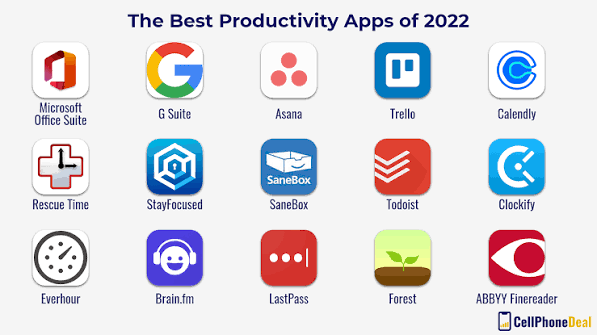
The best productivity app depends on your personal needs and work style. Notion is ideal for all-in-one organization, Todoist excels at task management, Trello offers visual project planning, Asana supports team workflows, and Google Calendar keeps your schedule organized. Apps like Evernote, OneNote, Slack, and ClickUp provide specialized features for note-taking, collaboration, and project management.
By choosing the right productivity tools and building strong work habits, you can save time, reduce stress, and accomplish more every day. Whether you are managing school assignments, business projects, or personal goals, investing in the right productivity app is a smart step toward long-term success.