
Introduction
Running a small business involves managing customers, tracking sales, handling marketing, and providing excellent customer service. As your business grows, keeping all customer information organised becomes more challenging. This is where a Customer Relationship Management (CRM) system can help.
A CRM is software designed to store customer information, manage interactions, automate tasks, and improve communication with leads and existing customers. Whether you own a retail store, an online business, or a service company, a CRM can save time and help increase sales.
In this article, you’ll learn what CRM is, why small businesses need it, its key features, benefits, and how to choose the right CRM solution.
What Is CRM?
CRM stands for Customer Relationship Management. It is a software platform that helps businesses manage customer data, sales activities, marketing campaigns, and customer support from one central location.
Instead of using spreadsheets, notebooks, or scattered emails, a CRM keeps everything organised so your team can quickly access customer information.
For example, if a customer contacts your business, your CRM can instantly show:
- Contact details
- Purchase history
- Previous conversations
- Support tickets
- Upcoming follow-ups
c
Why Small Businesses Need a CRM
Many small business owners believe CRM software is only for large companies. In reality, modern CRM solutions are affordable and designed specifically for small businesses.
A CRM helps small businesses:
- Organise customer information
- Track sales opportunities
- Improve customer relationships
- Increase team productivity
- Automate repetitive tasks
- Boost revenue
Without a CRM, businesses often lose potential customers simply because they forget to follow up.
Key Features of a CRM
1. Contact Management
CRM software stores customer details in one secure place.
It includes:
- Name
- Phone number
- Email address
- Company information
- Notes
- Communication history
Everything is easy to find whenever needed.
2. Sales Pipeline Management
A CRM helps businesses monitor every sales opportunity.
Typical stages include:
- New lead
- Contact made
- Proposal sent
- Negotiation
- Won
- Lost
This allows sales teams to understand where each customer is in the buying process.
3. Task Automation
Many repetitive tasks can be automated, including:
- Follow-up reminders
- Email campaigns
- Appointment scheduling
- Lead assignments
Automation saves valuable time every day.
4. Email Integration
Most CRM systems connect with email services.
Users can:
- Send emails
- Receive replies
- Track email opens
- Save conversations automatically
Everything stays connected to the customer’s profile.
5. Reporting and Analytics
CRM software generates reports that help business owners understand:
- Sales performance
- Lead conversion rates
- Customer growth
- Revenue trends
- Employee productivity
These reports support smarter business decisions.
Benefits of CRM for Small Businesses
Better Customer Relationships
Customers appreciate businesses that remember their preferences and respond quickly.
A CRM helps create personalised experiences that build trust and loyalty.
Increased Sales
Sales teams never miss follow-up opportunities because reminders and customer histories are always available.
More follow-ups often lead to higher conversion rates.
Improved Team Collaboration
When employees share one CRM database, everyone has access to the same customer information.
This prevents confusion and improves teamwork.
Time Savings
Automation reduces manual work.
Instead of updating spreadsheets, employees can focus on serving customers and closing deals.
Better Customer Service
Support staff can immediately view previous conversations and purchase history.
This allows them to solve customer problems faster.
Better Marketing
CRM systems help businesses send targeted marketing campaigns based on customer interests and buying behaviour.
This improves email open rates and increases sales.
How CRM Improves Sales
A CRM improves every stage of the sales process.
For example:
- Capture new leads.
- Store customer information.
- Schedule follow-up reminders.
- Send personalised emails.
- Track customer responses.
- Close more deals.
- Maintain long-term customer relationships.
Sales become more organised and predictable.
Industries That Benefit from CRM
CRM software works for nearly every industry, including:
- Retail
- E-commerce
- Real estate
- Healthcare
- Education
- Finance
- Marketing agencies
- Freelancers
- Consultants
- Construction companies
Any business that works with customers can benefit from a CRM.
Popular CRM Software for Small Businesses
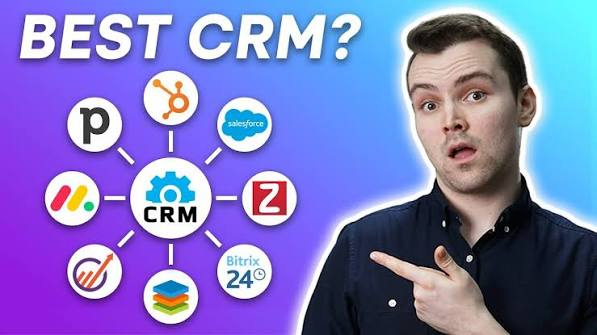
Some of the most popular CRM platforms include:
- HubSpot CRM
- Zoho CRM
- Salesforce Essentials
- Pipedrive
- Freshsales
- Monday CRM
- Insightly
- Nimble
- Capsule CRM
- Copper CRM
Each platform offers different pricing and features, allowing businesses to choose the one that best fits their needs.
How to Choose the Right CRM
Before selecting a CRM, consider the following:
Ease of Use
Choose software with a simple interface that your team can learn quickly.
Pricing
Compare monthly or yearly subscription costs and ensure the software fits your budget.
Features
Look for features such as:
- Contact management
- Sales tracking
- Email marketing
- Automation
- Mobile app
- Reporting
Integration
The CRM should work with tools you already use, such as email, accounting software, and e-commerce platforms.
Scalability
Choose a CRM that can grow with your business.
Common CRM Mistakes
Avoid these common mistakes:
- Not updating customer information
- Ignoring follow-up reminders
- Buying overly complex software
- Failing to train employees
- Not reviewing reports regularly
Keeping your CRM updated ensures accurate information and better decision-making.
Future of CRM
Modern CRM software is becoming smarter with technologies like artificial intelligence (AI).
AI-powered CRM tools can:
- Predict customer behaviour
- Recommend follow-up actions
- Score leads automatically
- Generate sales insights
- Automate customer support
Cloud-based CRM systems also allow users to access customer data securely from anywhere using a computer or smartphone.
Also Read:https://www.paradigmmarketinganddesign.com/
Conclusion
A CRM is one of the most valuable investments a small business can make. It helps organise customer information, improve communication, automate daily tasks, and increase sales while delivering better customer service.
Whether you are launching a new business or expanding an existing one, implementing the right CRM system can save time, strengthen customer relationships, and support long-term growth. By choosing a CRM that matches your business needs and using it consistently, you can improve efficiency, make informed decisions, and create a better experience for every customer.