

Good audio is one of the most important parts of a successful livestream. Viewers may forgive a slightly less impressive camera, but poor or unclear voice quality can make a stream difficult to enjoy. Whether you stream games, create YouTube content, chat with viewers, or record podcasts, choosing the right microphone can make a noticeable difference.
There are many streaming microphones available today, ranging from simple USB models to professional XLR microphones. The best choice depends on your budget, room environment, computer setup, and the type of content you create. Current 2026 microphone guides continue to highlight options from brands such as Shure, RØDE, Audio-Technica, SteelSeries, Elgato, and others.
What Makes a Good Streaming Microphone?
A good streaming microphone should provide clear voice reproduction without requiring an extremely complicated setup. It should also work well with your computer and streaming software.
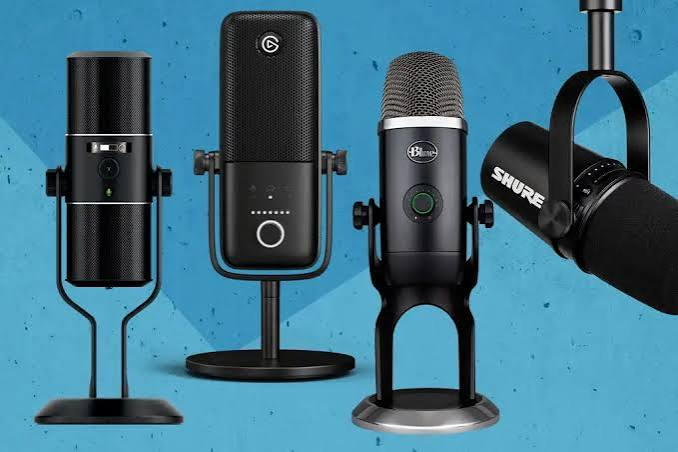
Some important features include:
- Clear and natural voice quality
- Good background-noise rejection
- Easy installation
- USB or XLR connectivity
- Convenient volume controls
- Headphone monitoring
- Solid build quality
- Compatibility with popular streaming software
You should also consider where you will use the microphone. A quiet room gives you more options, while a room with fans, keyboards, conversations, or other background sounds may benefit from a directional dynamic microphone.
USB vs. XLR Microphones
One of the first decisions is whether to buy a USB or XLR microphone.
USB Microphones
USB microphones are generally easier for beginners. You connect the microphone directly to your computer, select it as your input device, and configure it in your streaming software.
This makes USB microphones particularly convenient for new streamers who do not want to purchase additional audio equipment. Modern USB microphones can also provide excellent quality, and current guides list several strong plug-and-play options.
XLR Microphones
XLR microphones are more common in professional audio setups. Instead of connecting directly to your computer, an XLR microphone normally connects to an audio interface or mixer.
The advantage is flexibility. You can upgrade your audio equipment later and have more control over your microphone signal. However, an XLR setup can cost more and requires additional equipment.
For a beginner, USB is usually the simpler starting point. If you already have an audio interface or want to build a more advanced setup, XLR can be worth considering.
Best Overall Choice: Shure MV7+
The Shure MV7+ is a strong choice for streamers who want high-quality audio without immediately committing to a complicated studio setup.
The microphone combines USB and XLR connectivity, allowing users to start with a computer connection and later move toward a more advanced audio setup. Current streaming microphone guides highlight the MV7+ as a professional-oriented option for creators who want flexibility.
Its dynamic microphone design can also be useful for streaming environments where there may be moderate background noise.
The main disadvantage is that it costs more than many beginner USB microphones. However, creators who plan to stream regularly may appreciate its flexibility and upgrade potential.
Best Simple USB Option: Blue Yeti
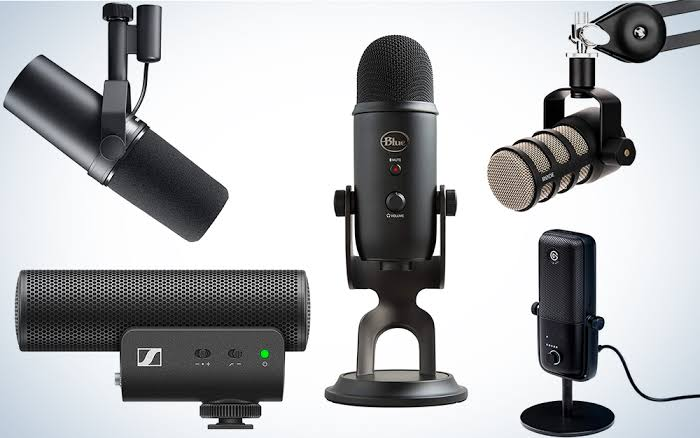
The Blue Yeti remains a familiar option for streaming and content creation. Its biggest advantage is simplicity. You can connect it to a computer without needing a separate audio interface.
It is also known for offering multiple pickup patterns, which gives users flexibility for different recording situations. Current 2026 guides continue to recommend the Blue Yeti as a versatile streaming microphone.
For a new streamer who wants a straightforward desktop microphone, the Blue Yeti can be a practical choice.
However, condenser microphones can pick up more environmental sound than some dynamic microphones. If your room has significant background noise, microphone placement becomes especially important.
Best Professional XLR Option: Shure SM7B
The Shure SM7B is one of the most recognizable microphones in professional broadcasting and podcasting. It is also popular among experienced content creators.
Its XLR design makes it better suited to users who already understand audio interfaces and microphone gain. It is not necessarily the best first microphone for someone who simply wants to plug a microphone into a laptop and start streaming.
For creators building a serious audio setup, however, it remains an important microphone to consider. Current microphone guides continue to include it among notable professional XLR choices.
Best Budget Approach
You do not need to spend hundreds of dollars to improve your streaming audio.
Budget USB microphones can provide a substantial improvement over a basic laptop microphone or inexpensive headset microphone. Current 2026 recommendations include several affordable USB models aimed at beginners.
When choosing a budget microphone, focus on voice clarity and reliability rather than RGB lighting or unnecessary features. A simple microphone positioned correctly can sound much better than an expensive microphone placed too far away.
Dynamic vs. Condenser Microphones
Another important decision is choosing between dynamic and condenser technology.
Dynamic microphones are often useful in less-than-perfect recording environments because they can be less sensitive to surrounding sounds. They are particularly popular for spoken-word applications.
Condenser microphones can capture detailed and sensitive audio. They can be excellent in quiet rooms, but their sensitivity means they may also capture keyboard sounds, fans, room reflections, and other noises.
Neither type is automatically better. Your environment and speaking style should determine which one makes more sense.
Microphone Placement Matters
Buying a good microphone is only part of getting better streaming audio. Placement can have an enormous effect on the final sound.
Try to keep the microphone reasonably close to your mouth without placing it directly in front of your lips. Experiment with its angle and distance until your voice sounds clear and natural.
A boom arm can also make positioning easier. It allows you to move the microphone closer when speaking and away when you need more desk space.
You can also use a pop filter or windscreen to reduce unwanted bursts of air from certain speech sounds.
Setting Up Your Microphone for Streaming
After connecting your microphone, open your streaming application and select it as your audio input.
Programs such as OBS can also provide filters that help improve voice quality. Common options include noise suppression, compression, and a limiter.
Do not over-process your voice. Too much noise reduction or compression can make speech sound unnatural. Start with simple settings and make small adjustments while monitoring your audio.
It is also a good idea to record a short test before starting a live stream. Listen through headphones and check whether your voice is too quiet, too loud, distorted, or affected by background noise.
What Should You Buy?
The best microphone depends on your needs.
If you want simplicity, a USB microphone is usually the easiest starting point. If you want a microphone that can grow with your setup, a USB/XLR model such as the Shure MV7+ is an attractive option. If you are building a professional audio system, an XLR microphone such as the Shure SM7B may be worth considering.
For budget-conscious beginners, there are also many affordable USB microphones available, so you do not need to spend a large amount of money immediately.
Also Read:https://gosensic.com/
Final Thoughts
The best microphone for streaming is not necessarily the most expensive model. The right microphone is the one that fits your room, computer, budget, and streaming style.
For beginners, USB microphones offer an easy way to start. More experienced creators may prefer USB/XLR hybrid microphones or a dedicated XLR setup. Good microphone placement, appropriate gain, and basic audio filters can be just as important as the microphone itself.
Before buying, think about your environment and how you plan to use the microphone. A well-chosen microphone can make your streams sound clearer, more professional, and more enjoyable for viewers.